Messages For Android
- 3.8
- Rating
- 1.00M
- Installs
- Free
- Price

 Analysis by App-foxy
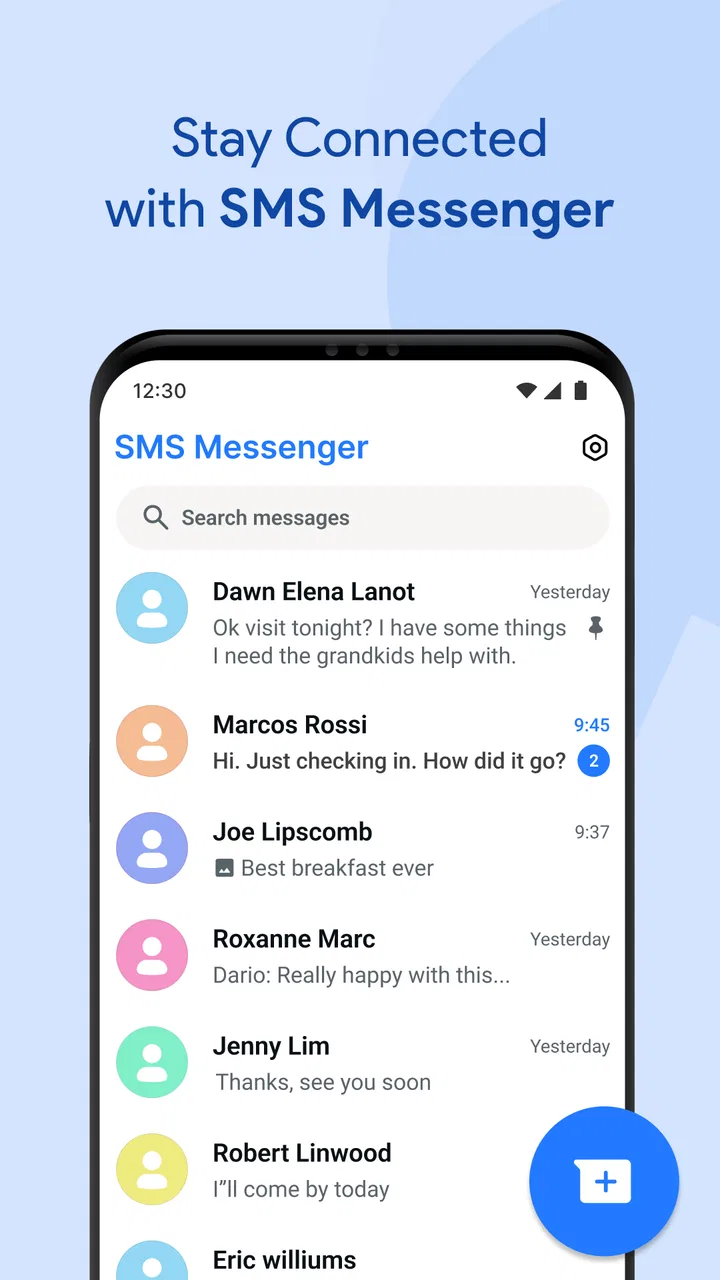
I spent time with Messages For Android as a straightforward communication app, and its biggest appeal is easy to understand: it keeps texting at the center instead of surrounding it with a large collection of unrelated tools. That makes it approachable for someone who wants to open an app, find a conversation, and send a message without much learning. In everyday use, I found the experience most convincing when I treated it as a focused SMS messenger rather than as a complete replacement for every modern chat service.
The app is developed by Akshay Mehta and belongs to the communication category. It is free to install, although in-app purchases range from $9.99 to $44.99 per item. The basic positioning is accessible enough for a broad audience, and its Everyone content rating makes it suitable for general household use. The current version is 4.7, while compatibility begins with Android 8.0, so it is aimed at a wide range of Android phones rather than only recent hardware.
How Messages For Android feels during ordinary texting
My first impression was that the app is built around reducing friction. SMS is still useful when I need to reach someone who is not using the same chat platform, and a dedicated messenger can feel more direct than a social network inbox. I could imagine using this as the default place for short practical exchanges: confirming an appointment, checking whether someone has arrived, sharing a quick reminder, or replying to a family message while away from a larger chat service.
You May Also Like

 Blood Strike: 2.5 Anniversary
Blood Strike’s Loadouts Turn Every Drop Into a Tactical Gamble
A close look at Blood Strike’s custom loadouts: how fast access to signature weapons reshapes its battle royale rhythm, rewards preparation, and narrows the gap between fights.

 Pandora - Music & Podcasts
Pandora’s Music Is Easy to Start, but Harder to Recover
Pandora’s strength is its low-effort path from a seed to a station. Its weak spot is how much confidence it asks you to place in connection, setup, and quiet recovery.

 8 Ball Pool
 Is Built on Rivalries, Rematches, and Routine
A close look at the rivalries, rematches, shared routines, and unanswered safety questions that turn a quick pool match into a persistent mobile community.

 Samsung Music
’s Quiet Strength Is Playing What You Already Own
Its reach comes less from spectacle than from dependable access to a personal library. That simplicity is both the app’s strongest retention engine and its ceiling.

 AccuWeather: Weather Radar
AccuWeather Review: A Quick, Clear Forecast for Everyday Decisions
For everyday plans, the best forecast is the one you can understand quickly. AccuWeather makes rain timing, radar, and local conditions easy to act on, with a few trade-offs.

 Hill Climb Racing
Why Hill Climb Racing Still Turns Crashes Into One More Run
A tiny car, a bumpy hill and one more upgrade: Hill Climb Racing keeps resurfacing because its simple chaos makes every near-miss feel personal.
More From Our News Desk



That simplicity also shapes the speed expectations. A messenger that focuses on text should feel ready for quick interactions, but the app itself cannot control every part of the delivery path. Phone hardware, Android background behavior, signal quality, carrier handling, and the recipient’s device can all affect what happens after I press send. I therefore judge it less by an unrealistic promise of instant delivery and more by whether the conversation remains easy to open, read, and continue.
On a phone that still runs Android 8.0, keeping expectations sensible matters. Older devices may take longer to open any app, and limited storage or aggressive battery management can affect background behavior. Messages For Android is a reasonable candidate for older hardware because its purpose is narrow, but “lightweight” should not be confused with guaranteed performance on every phone. The surrounding Android system remains part of the experience.
The practical advantage is focus: I do not need to learn a complicated social environment before sending a normal text. That is particularly useful for people who prefer conventional messaging, users who are helping a less technical family member, and anyone who wants a separate place for SMS conversations instead of mixing them with email or social notifications.
What happens when conversations become busy
A quiet one-to-one conversation is the easiest test for this kind of app. The more revealing situation is a busy day with several active threads, repeated replies, and messages arriving close together. In that setting, organization matters as much as opening speed. I would use a simple habit here: keep the conversation list as a working queue, answer urgent threads first, and avoid treating the app like an archive for every kind of communication.
This is one of the less obvious trade-offs of a focused SMS tool. It can be calmer than a feature-heavy chat platform, but it may feel limited when I expect group collaboration, media-heavy conversations, reactions, searchable cloud history, or cross-device continuity. A person who mainly sends short texts may appreciate the restraint. Someone managing a large community or coordinating a project will probably find a richer internet-based messenger more suitable.
For heavy daily use, I would also pay attention to the difference between the app responding and a message actually reaching its destination. A conversation can open normally while delivery is delayed by network conditions. If a message is important, I would look for the app’s visible status and, when timing matters, confirm through another channel rather than assuming that pressing send equals immediate receipt.
A useful workflow is to separate urgent communication from routine updates. I would use Messages For Android for direct, ordinary texts, but I would not rely on it as the only channel for a time-sensitive travel change, a work handoff, or an emergency instruction. That is not a criticism unique to this application; it is a sensible boundary for SMS-based communication in general.
Stability, interruptions, and recovering from a missed moment
Reliability in messaging has two layers. The first is whether the application remains usable when I open it. The second is whether I can recover gracefully after an interruption: a phone restart, a weak connection, a notification I accidentally dismissed, or a conversation I forgot to answer. A good messenger should make it easy to return to the relevant thread without forcing me to reconstruct what happened from memory.
Messages For Android is most appealing when I want a familiar route back to my conversations. If I miss a notification, I can approach the app as a central inbox rather than searching through several communication services. That makes it useful for someone who receives practical texts throughout the day and wants a clear place to check them later.
Still, I would not treat the app as a guaranteed backup for every message-related problem. Recovery can depend on the phone’s notification settings, Android’s background restrictions, available storage, and the way the device handles the messaging application. If a particular conversation is important, I recommend checking that notifications are enabled and that the app is not being excessively restricted by the phone’s battery controls.
Another sensible precaution is to avoid assuming that an old thread is automatically a complete record of every exchange. Messaging history is valuable, but phones change, settings can be reset, and users sometimes clear conversations accidentally. For personal records or work information, I would keep the important details somewhere more deliberate instead of depending on one inbox alone.
The app’s broad adoption is a reassuring sign for people who do not want an obscure utility. It has passed one million installs, holds an average rating of 4.0 from around 3.8 thousand ratings, and has received 541 reviews. Those figures suggest a product with a meaningful user base, but they should not replace personal testing on a specific phone. Messaging behavior can vary noticeably between manufacturers and Android configurations.
Older phones, storage, and everyday device limits
Compatibility with Android 8.0 is important because it opens the door to phones that are no longer considered new. For a user with an older handset, the key question is not only whether the app installs, but whether the entire phone still has enough breathing room for dependable daily communication. Low storage, a crowded notification tray, and a tired battery can make even a simple messenger feel inconsistent.
I would prepare an older device before judging the app too quickly. Clear unnecessary storage, update Android components when the phone offers them, review notification permissions, and check whether the system is putting the application to sleep. These steps do not add features, but they remove common sources of confusion. They are especially useful when a user says, “I received the message late,” because the cause may be the phone’s power management rather than the conversation interface.
On a newer Android phone, the app should be easier to evaluate on its own terms. I would expect the interface to feel less constrained by memory and processor limits, although network quality still remains outside the app’s control. I also prefer testing it during a normal day rather than opening it once and making a broad conclusion. A messenger earns trust through repeated small interactions: opening a thread, returning later, replying after an interruption, and finding a recent conversation without hesitation.
Resource demands are another reason to keep the judgment measured. The app’s focused purpose suggests a simpler workload than a platform built around video feeds, live rooms, or large media libraries, but I would not invent a battery or memory claim without measuring the exact device. My practical advice is to watch the phone’s own battery and storage screens if you suspect unusual behavior, then compare that with other apps used during the same period.
There is also a human device constraint: not everyone wants to migrate contacts and conversations to a new communication habit. Messages For Android works best for people who already think in terms of text messages and want a dedicated interface for them. It is less compelling for a user whose friends, family, and colleagues all communicate in one encrypted internet chat service. In that case, the social network around the app matters more than the app’s simplicity.
Where it fits beside the usual alternatives
Compared with a standard phone messaging utility, Messages For Android is attractive if I want a specifically focused SMS experience and a recognizable standalone app. Compared with internet messengers, its role is different. Services built around accounts, data connections, media sharing, group tools, and multi-device access may be better for long conversations and collaborative communication. They can also create a stronger lock-in: everyone needs to use the same service, and moving between platforms may be inconvenient.
That comparison is not about declaring one universal winner. I would choose Messages For Android when the recipient may not share my preferred chat platform, when I need conventional texting, or when I want to keep ordinary messages separate from social feeds. I would choose another messenger when the conversation depends on large files, extensive group coordination, rich media, or a synchronized history across several devices.
There is a privacy and continuity trade-off in that choice as well. A user may prefer an internet messenger because it offers a particular security model or account-based history, while another user may value the directness of ordinary SMS. The right decision depends on the people I need to reach and the kind of information I send. I would not move sensitive or highly confidential discussions into any communication tool without first understanding the relevant protections and the recipient’s setup.
The optional purchase range also deserves a practical look. The app is free to use at its entry point, but the presence of in-app purchases means I would inspect what is included before paying. I would only consider an upgrade if it solves a specific annoyance in my own routine. Someone who only needs basic texting should avoid assuming that every paid option is necessary, while a frequent user may decide that an extra convenience is worthwhile after trying the free experience.
A realistic day with the app
Imagine that I am commuting and need to coordinate a pickup. I send a short message, return to another task, and later open the app to check the conversation. The value here is not dramatic; it is the absence of unnecessary steps. I can keep the exchange separate from work email, avoid opening a social feed, and return to the thread when the other person replies. If the connection is unreliable, I check the message status and use a call when the timing becomes critical.
For a family member using an older Android phone, I would set up the app deliberately rather than simply handing over the device. I would make sure notifications are visible, explain where recent conversations appear, and show how to return to a thread after dismissing an alert. That small orientation is more useful than assuming that a simple interface needs no explanation.
For work, I would use it for short logistical notes rather than as the sole record of decisions. A text can be convenient for “I am outside” or “the delivery has arrived,” but longer instructions are easier to track in a dedicated work system. This boundary prevents the inbox from becoming an accidental project archive and reduces the risk of losing context in a long sequence of short replies.
Who should install it, and who should skip it
I would recommend Messages For Android to someone who wants a direct communication app for SMS, values a less distracting workflow, and uses an Android phone that meets the Android 8.0 requirement. It is also a sensible option for households that need an approachable messaging tool without introducing a separate social account or asking every contact to join a new service.
I would be more cautious about recommending it to someone who expects a full modern chat platform. If your daily conversations depend on rich group management, extensive media exchange, desktop continuity, or a particular security feature, compare those needs against the app before making it your main messenger. A focused SMS application can be perfectly useful and still be the wrong tool for a communication-heavy lifestyle.
I would also skip it as a first choice if my phone already has a messaging solution that my contacts understand and that fits my workflow better. Switching apps has a cost: I need to learn a new layout, review settings, and make sure notifications behave properly. The fact that this app is free does not remove that time cost, so the move should solve a real problem rather than happen simply because another option exists.
My performance verdict after weighing speed and limits
Messages For Android makes the strongest case through focus. It is a free communication app from Akshay Mehta with a current version of 4.7, broad Android compatibility beginning at Android 8.0, and enough adoption to feel like a practical choice rather than an experimental download. Its Everyone rating also makes it comfortable to consider for general users.
I would describe its perceived performance as dependent on the whole phone and network path, not just the application. On suitable hardware, a focused messenger should feel uncomplicated during ordinary texting. During busy periods, the important questions are whether I can return to the right conversation, understand the visible message state, and recover after interruptions. Those are the habits that make it dependable in real life.
My final recommendation is conditional but positive: choose it if you want SMS to remain simple and central, especially on an Android phone that does not need an elaborate chat ecosystem. Keep notifications and battery settings in view, do not confuse sending with guaranteed immediate delivery, and use a different service when your conversations require richer collaboration or continuity across devices. With those expectations, Messages For Android is a practical, approachable choice for everyday texting rather than an all-purpose replacement for every messenger.
FAQs for Messages For Android
01What features does Messages For Android offer compared to other messaging apps?
Messages For Android offers a range of features including SMS, MMS, group messaging, and rich media sharing. It supports emojis, stickers, and voice messages. The app also includes message scheduling, customizable themes, and a secure end-to-end encryption option for privacy-conscious users. It integrates seamlessly with your Android device, ensuring a smooth messaging experience.
02Is Messages For Android secure and does it offer privacy features?
Yes, Messages For Android includes several security and privacy features. It supports end-to-end encryption for chats, ensuring that your conversations remain private. The app allows users to block unwanted contacts and manage notifications, providing greater control over personal information. Regular updates are released to address any security vulnerabilities.
03Can I use Messages For Android on multiple devices simultaneously?
Messages For Android primarily functions on a single device. However, with the integration of Google Messages for Web, users can access and send messages from their computer. Simply scan a QR code using your phone to connect both devices. This feature requires an active internet connection on both the phone and the computer.
04Does Messages For Android support multimedia and group messaging?
Yes, Messages For Android fully supports multimedia messaging, allowing users to send images, videos, and audio files. It also facilitates group messaging, making it easy to chat with multiple contacts simultaneously. The app offers easy management of group chats with features like naming groups and adding or removing participants.
05Are there any costs associated with using Messages For Android?
Messages For Android itself is free to download and use. However, sending SMS and MMS messages might incur charges based on your mobile carrier's plan. Data usage for features like Google Messages for Web or multimedia sharing will depend on your internet service provider and mobile data plan. Always check with your carrier for specific costs.
Pros
- Seamless integration with Android devices.
- Supports rich media sharing effortlessly.
- End-to-end encryption for secure chats.
- Customizable notifications and themes.
- Works well with group conversations.
Cons
- Lacks cross-platform availability.
- Limited customization for chat layout.
- Occasional sync issues with older devices.
- No built-in scheduling for messages.
- Can be resource-intensive on low-end devices.

Messages For Android
Gallery